Business Software
Address Book Software
Personal Edition
Business Edition
Accessories
Order Entry Software
Sports Software
Tournament Software
Pro Edition
Lite Edition
League Software
StatTrak
Baseball & Softball
Basketball
Volleyball
Hockey
Football
Soccer
Sports Books
All Books
Contact Us
License Agreement
How to Uninstall
Upgrade Policy
Return Policy
Privacy Policy
|
|
 |
 |
 |
 |
 |
 |
|

Download Now & We'll send you the CD too
After you checkout, you'll be shown a link so you can download the software and start using it immediately. We'll also ship you a CD-ROM for your backup if you ever need to reinstall.
|
|
More Details:
|
More Features in Address Manager
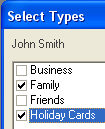 Multiple Address Types Multiple Address Types
Assign multiple address types to one entry. For example, assign John Smith to your Family list and also your Holiday Card list. And remember you can add your own custom Address Types.
Label Sheets
With StatTrak Address Manager you have the flexibility to print address labels for just 1 address, specific Address Types, or your whole list. You can also choose to have your addresses start down further on the sheet so you can re-use a label sheet. Backup Data
Backup to your hard drive, or USB drive (recommended). Then if you need to recover your data you can restore it from your backup (instead of re-typing!). You can also use the backup and restore function to transfer your data to your laptop. Sorting
You have the option to sort your addresses by zip code, street address, city, state, or country before you print labels or envelopes. Addresses for Birthday Cards
When viewing the birthday report, you can choose to print labels or envelopes for everyone with a birthday that month. Business Edition
If you need multiple people to access the same addresses, please see our Business Edition. StatTrak Address Manager Business Edition also has more phone number fields, a separate line for company name and custom fields.
|
|
 |
 |
 |
 |
|
|
|